7. Overview: I/O Layers
This section is informative.
7.1. From source to HTML
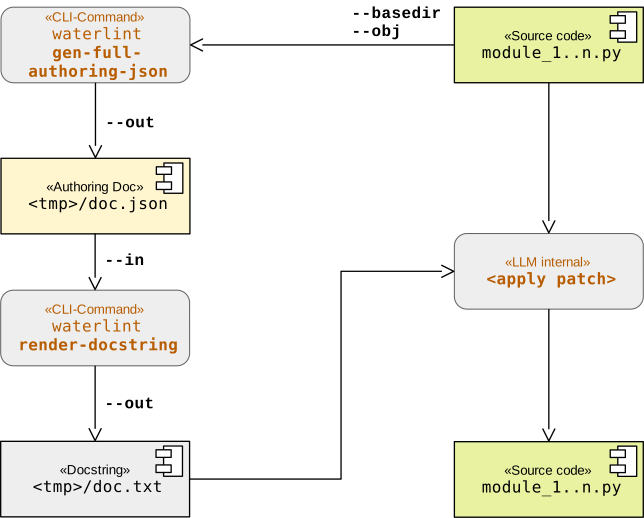
The following diagram illustrates the typical workflow for generating both LLM-readable and human-readable documentation, including the integration of code examples. It highlights the transformation from source code to structured JSON artifacts and finally to rendered HTML.
The individual stages of this workflow are described in detail in sections The JSON I/O Layer and The HTML Output Layer.
7.2. Walk and carve
waterlint provides a mechanism to inspect, filter, and refine
the set of objects that enter the documentation pipeline. This functionality
is implemented by the combination of the subcommands walk and
carve.
The command walk expects one or more modules located within a
common base directory and traverses all reachable documented objects. Its
output is a canonical intermediate JSON artifact that reflects the current
object graph and visibility state of the source tree.
This artifact is useful as a source of truth for later processing, but it is not intended as a general exchange format. Many entries are tied to concrete filesystem paths and local name resolution, so the resulting JSON is highly meaningful within the originating tree but not portable across unrelated environments.
The output (text or JSON) represents the discovered object graph. The text output is intended for human inspection, while the JSON output provides a machine-readable intermediate representation suitable for further processing.
By default, each entry contains fields such as:
qualname– qualified name of the objectkind– object category (module, class, function, …)scope– visibility scope as defined in this documentfile– path to the module containing the objectlineno– source line number of the object definitionincluded– whether the object participates in a valid Waterloo artifactreason– reason for exclusion (e.g.no_doc,invalid)
In text mode, file paths are compacted and accompanied by a legend. In JSON mode, paths are represented canonically.
The JSON output is described by schema
wtrl-walk-json-*.*.*.schema.json
and can be validated using
waterlint validate-json
The command carve provides a deliberate editing and projection
layer for walk JSON artifacts. In particular, the --drop and
--keep options allow selective inclusion or exclusion of
namespaces by qualified-name prefix chains.
Conceptually, carve acts as an operator transforming one walk
JSON artifact into another walk JSON artifact. It preserves the canonical
schema shape, but may simplify, filter, and recompute derived summary data.
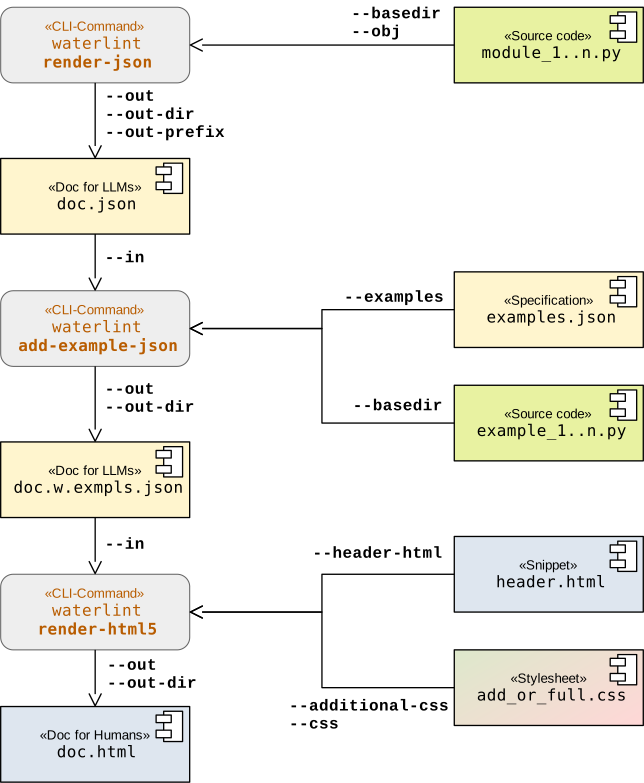
The resulting JSON artifact can then be passed directly to
waterlint render-json instead of specifying modules explicitly,
as illustrated in the following diagram.
7.3. Authoring JSON
Early experience with the Waterloo Docstring format showed that LLMs can find
some syntactic rules difficult to control reliably. In particular, contract
items such as Contract.general,
Contract.constructor, Contract.requires, and
Contract.ensures express one logical statement across one or
more physical lines. Free-form sections have a related issue: paragraphs are
separated with the Waterloo | marker, whereas LLMs commonly introduce a
blank physical line.
For these reasons, waterlint 0.23.0 introduces Authoring JSON and
its accompanying schema. The format represents the semantic structure of one
Waterloo docstring as a strictly validated JSON object. A deterministic
renderer subsequently translates that object into the final Waterloo
Docstring format. Each Authoring JSON document describes exactly one Python
object, such as a module, class, function, or method.
The fixed JSON structure prevents many purely structural mistakes before a docstring is rendered. It does not replace the final validation cycle: only the real Python object supplies source-specific facts such as its signature, exception classes, references, scopes, and allowed sections.
The Authoring JSON format is validated by the distributed schema file
wtrl-authoring-object-json-*.*.*.schema.json
The following waterlint subcommands work with Authoring JSON:
validate-jsonvalidates Authoring JSON as well as the other supported JSON artifact formats.gen-minimal-authoring-jsongenerates the required initial structure for one Python object.gen-full-authoring-jsongenerates all profile-allowed structure that can be derived without inventing list entries or other identifiers.gen-showcase-authoring-jsonwrites a profile-specific, editable Authoring JSON showcase. It demonstrates the supported structures for the selected profile, including text blocks and tables where applicable.render-docstringrenders Authoring JSON as raw Waterloo docstring content.
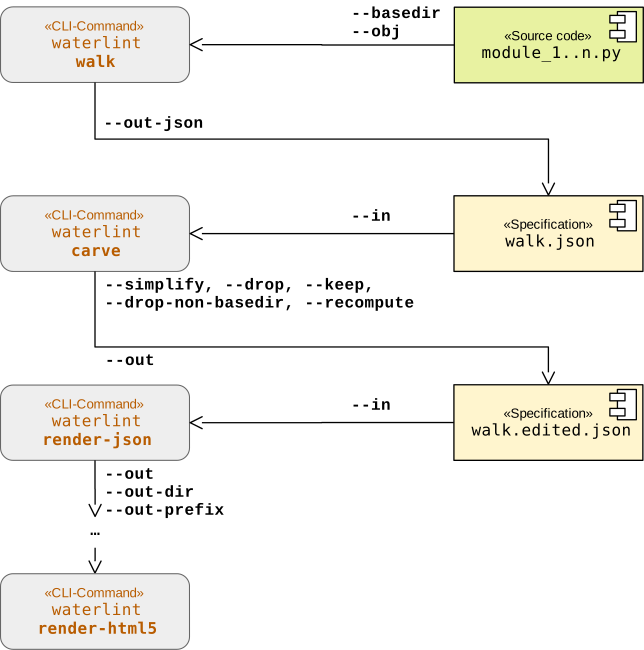
In practice, an LLM authors a docstring as follows:
Start from a Python object identified by
--basedirand--obj.Generate a complete editable starting point with
waterlint gen-full-authoring-json. Edit itsdocobject and usewaterlint validate-jsonwhen an explicit JSON validation step is useful.Render the document with
waterlint render-docstring. The renderer turns paragraphs, lists, indentation, physical lines, and continuation backslashes into their canonical Waterloo representation.Insert the rendered content as the Python docstring and validate the real target with
waterlint validate.If validation reports a problem, correct the Authoring JSON and repeat the rendering and target-validation steps. Keeping corrections in the Authoring JSON prevents the source docstring and its editable representation from drifting apart.
The draft_docstring MCP prompt (“Draft a Waterloo docstring”)
recommends this workflow to LLM clients. The following diagram shows the
successful path without validation failures: